 DiskCatalogMaker
詳細情報
| タイトル | DiskCatalogMaker |
|---|---|
| URL | http://diskcatalogmaker.com/ |
| バージョン | ver 9.3.1 |
| 更新日 | 2026/08/31 |
| 追加日 | 2016/05/11 |
| 種別 | シェアウェア(2980円) |
| 説明 | 高速検索アルゴリズムを搭載したディスクカタログ管理アプリ。 |
レビュー
概要
DiskCatalogMakerは、Mac向けのディスクカタログ管理ソフトウェアです。CD、DVD、Blu-ray、外付けドライブ、USB メモリなどのメディアに収録されたファイル情報をカタログ化して管理するツールで、メディアを挿入せずにコンテンツを検索・閲覧できます。「シンプル・高速・スマート」をコンセプトに開発されており、macOSのFinderに近い直感的な操作感で利用できます。Apple Silicon(M1/M2/M3)にもネイティブ対応し、モダンなmacOS環境で快適に動作します。
主要な特徴・機能
- 簡単なカタログ作成: ディスクアイコンをドラッグ&ドロップするだけで自動スキャンしてカタログを生成
- バッチスキャン: 複数のメディアをまとめてスキャンするバッチモードに対応
- サムネイル生成: 画像・動画ファイルのサムネイルを自動生成して視覚的に管理
- 高度な検索機能: ファイル名・属性による検索のほか、AND/OR ブール検索式をサポート
- Spotlight 統合: macOSのSpotlightからもカタログ内のファイルを検索可能
- Finder風インターフェース: アイコン表示・リスト表示・カラム表示など馴染みのある操作性
- 圧縮ファイル対応: ZIP、RAR、7-Zipなど主要な圧縮形式のアーカイブ内容もカタログ化
- 複数カタログ管理: 複数のカタログを同時に開いて横断検索が可能
- ダークモード対応: macOSのダークモードに対応した見やすいUI
- 多言語対応: 日本語を含む13言語でローカライズされている
- Roxio Toast Titanium連携: CDライティングソフトとの連携に対応
対象ユーザー
- 大量のCD・DVD・外付けドライブなどメディアを管理したい個人ユーザー
- 写真・動画・音楽コレクションを整理・検索したいクリエイター
- メディアアーカイブを管理する業務ユーザー・図書館・資料管理担当者
- macOSユーザーで物理メディアの資産管理を効率化したい方
ライセンス情報
有料の商用ソフトウェアです。30日間の無料試用期間が設けられています。購入後は以下のライセンスが利用可能です。
- ユーザーライセンス: $38.99(1台のMacで使用可能)
- ファミリーライセンス: $79.99(同一家庭内の複数台のMacで使用可能)
動作環境はmacOS 10.14 Mojave以降、Intel MacおよびApple Silicon Macに対応。公式サイト(https://diskcatalogmaker.com/)から購入・ダウンロード可能です。
スクリーンショット
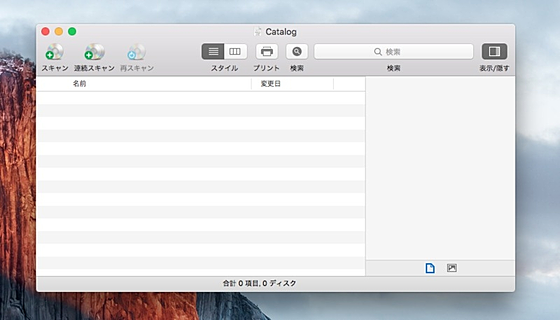
更新グラフ
バージョン履歴
version 9.3.1 - Sep 1, 2026
Tuned UI for better user experience.
version 9.3 - Aug 16, 2026
Fixed compatibility issues with macOS 27.
Tuned UI for better user experience.
version 9.3 - Aug 16, 2026
Fixed compatibility issues with macOS 27.
version 9.3 - Aug 16, 2026
Fixed compatibility issues with macOS 27.
version 9.2.9 - Aug 15, 2026
Improved the Inspector to display the purgeable size in the Available field for APFS disks.
Fixed an issue where thumbnail images were not rendered when resizing the window.
This is the last version of DiskCatalogMaker that will run on macOS 10.14 / macOS 10.15 / macOS 11.
version 9.2.8 - Aug 8, 2026
Added support for importing the actual disk usage of an APFS volume group.
Fixed an issue where the primary catalog might be created twice during the initial startup.
Fixed compatibility issues with macOS 27.
version 9.2.9 - Aug 15, 2026
Improved the Inspector to display the purgeable size in the Available field for APFS disks.
Fixed an issue where thumbnail images were not rendered when resizing the window.
This is the last version of DiskCatalogMaker that will run on macOS 10.14 / macOS 10.15 / macOS 11.
version 9.2.8 - Aug 8, 2026
Added support for importing the actual disk usage of an APFS volume group.
Fixed an issue where the primary catalog might be created twice during the initial startup.
version 9.2.8 - Aug 8, 2026
Added support for importing the actual disk usage of an APFS volume group.
Fixed an issue where the primary catalog might be created twice during the initial startup.
version 9.2.7 - Jul 26, 2026
A few minor updates to make this app better.
Fixed compatibility issues with Microsoft OneDrive.
Added support for importing the actual disk usage of an APFS volume group.
Fixed an issue where the primary catalog might be created twice during the initial startup.
version 9.2.7 - Jul 26, 2026
A few minor updates to make this app better.
Fixed compatibility issues with Microsoft OneDrive.
version 9.2.7 - Jul 26, 2026
A few minor updates to make this app better.
This is the last version of DiskCatalogMaker that will run on macOS 10.14 / macOS 10.15 / macOS 11.
version 9.2.6 - Jul 3, 2026
Added support for importing and searching Finder comments.
Tuned UI for better user experience.
A few minor updates to make this app better.
This is the last version of DiskCatalogMaker that will run on macOS 10.14 / macOS 10.15 / macOS 11.
version 9.2.6 - Jul 3, 2026
Added support for importing and searching Finder comments.
Tuned UI for better user experience.
version 9.2.6 - Jul 3, 2026
Added support for importing and searching Finder comments.
Tuned UI for better user experience.
version 9.2.5 - Jun 12, 2026
Fixed compatibility issues with macOS 10.14.
Added support for importing and searching Finder comments.
Tuned UI for better user experience.
version 9.2.5 - Jun 12, 2026
Fixed compatibility issues with macOS 10.14.
version 9.2.5 - Jun 12, 2026
Fixed compatibility issues with macOS 10.14.
version 9.2.4 - May 16, 2026
Fixed compatibility issues with Touch Bar.
Fixed compatibility issues with macOS 10.14.
version 9.2.4 - May 16, 2026
Fixed compatibility issues with Touch Bar.
version 9.2.4 - May 16, 2026
version 9.2.3 - May 16, 2026
Fixed an issue where the text encoding for export did not change when overriding the application-specific language settings in System Settings.
version 9.2.3 - May 16, 2026
Fixed an issue where the text encoding for export did not change when overriding the application-specific language settings in System Settings.
version 9.2.3 - May 16, 2026
Fixed compatibility issues with Touch Bar.
Fixed an issue where the text encoding for export did not change when overriding the application-specific language settings in System Settings.
version 9.2.2 - Apr 18, 2026
Fixed compatibility issues with macOS 26.
Tuned UI for better user experience.
Fixed compatibility issues with Touch Bar.
Fixed an issue where the text encoding for export did not change when overriding the application-specific language settings in System Settings.
version 9.2.2 - Apr 18, 2026
Fixed compatibility issues with macOS 26.
Tuned UI for better user experience.
version 9.2.2 - Apr 18, 2026
Fixed compatibility issues with macOS 26.
Tuned UI for better user experience.
version 9.2.1 - Apr 11, 2026
Added an option to exclude folders from scan by specifying their names.
Fixed an issue where hidden attributes could not be read on some file systems.
Fixed compatibility issues with macOS 26.
Tuned UI for better user experience.
version 9.2.1 - Apr 11, 2026
Added an option to exclude folders from scan by specifying their names.
Fixed an issue where hidden attributes could not be read on some file systems.
version 9.2.1 - Apr 11, 2026
Added an option to exclude folders from scan by specifying their names.
Fixed an issue where hidden attributes could not be read on some file systems.
This version is a free upgrade for registered users of DiskCatalogMaker.
Added an option to exclude folders from scan by specifying their names.
Fixed an issue where hidden attributes could not be read on some file systems.
This version is a free upgrade for registered users of DiskCatalogMaker.
version 9.2 - Mar 22, 2026
Added a “Find All Duplicates” feature that finds duplicate files by matching their name, size, date created, and date modified.
Added the ability to move the original to the Trash.
Added the ability to determine whether content in original files matches via the duplicates result window.
Increased the maximum number of search results from 10,000 to 100,000.
Tuned UI for better user experience.
Fixed some minor bugs.
version 9.1.11 - Feb 22, 2026
Fixed a problem where an unnecessary folder was being generated when creating a new catalog file.
Updated some translations.
Added a “Find All Duplicates” feature that finds duplicate files by matching their name, size, date created, and date modified.
Added the ability to move the original to the Trash.
Added the ability to determine whether content in original files matches via the duplicates result window.
Increased the maximum number of search results from 10,000 to 100,000.
Tuned UI for better user experience.
Fixed some minor bugs.
version 9.1.11 - Feb 22, 2026
Fixed a problem where an unnecessary folder was being generated when creating a new catalog file.
Updated some translations.
 RSS[全体]
 Tw[@softantenna]