 Komet
Komet
詳細情報
| タイトル | Komet |
|---|---|
| URL | https://github.com/zorgiepoo/Komet |
| バージョン | ver 1.5.1 |
| 更新日 | 2026/02/22 |
| 追加日 | 2016/09/06 |
| 種別 | フリーソフト |
| 説明 | コミットメッセージ専用の軽量テキストエディタ。 |
レビュー
概要
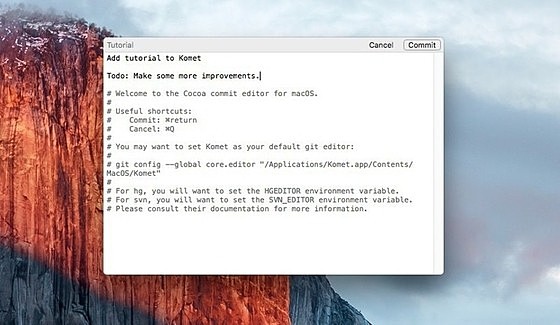
Kometは、Amir Michail氏(zorgiepoo)が開発したmacOS向けのGitコミットメッセージ専用エディタです。2016年8月にGitHubで公開されて以来、継続的にアップデートが続けられています。macOSのCocoaフレームワークでネイティブ実装されており、Gitがコミットメッセージの入力を求める際に自動的に起動するエディタとして機能します。一般的なテキストエディタをコミットエディタとして使用する場合と比べて、コミットメッセージの作成に特化したUIと支援機能を提供し、質の高いコミットメッセージを効率よく書くことを支援します。
主要な特徴・機能
- コミットメッセージ専用UI - Gitコミットメッセージの作成に最適化されたシンプルなインターフェース
- キーボードショートカット -
⌘ ↩でコミット適用、Escでキャンセルという直感的な操作 - 自動フォーマット - サブジェクト行(1行目)の後に自動的に空行を挿入し、Gitのコミットメッセージ規約に準拠したフォーマットを促進
- 行長警告 - サブジェクト行・本文行が推奨文字数(サブジェクト72文字など)を超えた場合に視覚的にハイライト表示
- スペルチェック - macOS標準のCocoaスペルチェックと自動修正機能に対応
- 複数VCS対応 - Git、Jujutsu(jj)、Mercurial、Subversionのコミットメッセージ編集に対応
- 複数テーマ - ライト・ダークを含む複数のビジュアルテーマを選択可能
- ネイティブmacOSアプリ - Cocoaで実装された軽量・高速なネイティブアプリケーション
対象ユーザー
- Gitを日常的に使用し、コミットメッセージの品質にこだわるmacOS上の開発者
- チーム開発でコミットメッセージの規約(Conventional Commits等)を守りたいエンジニア
- ターミナルのVimやNano以外の快適なコミットエディタを求めるmacOSユーザー
- コミット作業をよりスムーズに行いたいすべてのGitユーザー(macOS 12.4以降)
ライセンス情報
MITライセンスのオープンソースソフトウェアとして公開されています。商用・非商用を問わず無料で使用・改変・配布が可能です。GitHubリポジトリ(zorgiepoo/Komet)でソースコードが公開されており、macOS向けのバイナリはGitHub Releasesから無料でダウンロード可能です。対応OSはmacOS 12.4(Monterey)以降です。
スクリーンショット
更新グラフ
バージョン履歴
Changes:
- Fix first overflow line limit warning when first line is a comment (common in jj)
- Move check for updates progress indicator further away from cancel button
- Update Sparkle and enable feed update signing verification
Changes:
- Fix first overflow line limit warning when first line is a comment (common in jj)
- Move check for updates progress indicator further away from cancel button
- Update Sparkle and enable feed update signing verification
Changes:
- Update app icon for macOS Tahoe design style (#26 (comment)) (thanks @yuraiz !)
- Stylize top bar for macOS Tahoe which includes new styling for commit/cancel buttons and increased bar height
- Add color highlighting for changed files (modified, new, removed, etc) (#41)
- Add support for Jujutsu (jj) VCS (#39)
- Fix changing fonts not working on macOS 26 (70f99e1)
- Escape editor path in tutorial (#36) (thanks @Cykelero !)
- Add user default to allow legacy app activation (a115442)
- Update Sparkle
Changes:
- Update app icon for macOS Tahoe design style (#26 (comment)) (thanks @yuraiz !)
- Stylize top bar for macOS Tahoe which includes new styling for commit/cancel buttons and increased bar height
- Add color highlighting for changed files (modified, new, removed, etc) (#41)
- Add support for Jujutsu (jj) VCS (#39)
- Escape editor path in tutorial (#36) (thanks @Cykelero !)
- Add user default to allow legacy app activation (a115442)
- Update Sparkle
In the app beta updates can be enabled in Settings > Advanced.
Changes:
- Update app icon for macOS Tahoe design style (#26 (comment)) (thanks @yuraiz !)
- Escape editor path in tutorial (#36) (thanks @Cykelero !)
- Add user default to allow legacy app activation (a115442)
- Update Sparkle
Likely more changes to come for updating to macOS Tahoe appearance.
In the app beta updates can be enabled in Settings > Advanced.
Changes:
- Add support for detecting scissored lines when using git commit --verbose and fix cursor position
- Add diff text color highlighting when using git commit --verbose
- Don't generate loose icon file outside of the asset catalog
- Suppress insecure state restoration warning
- Change Preferences to Settings in tutorial
- Set App Category to Utilities
- Update Sparkle to 2.6.3
Changes since 1.4 (beta 1):
- Highlight foreground color for diff highlighting for dark themes
- Add support for detecting scissored lines when using
git commit --verboseand fix cursor position - Add diff text color highlighting when using
git commit --verbose - Don't generate loose icon file outside of the asset catalog
- Suppress insecure state restoration warning
- Change Preferences to Settings in tutorial
- Set App Category to Utilities
- Update Sparkle to 2.6.3
- Update Komet's App Icon (#29) (Yuri Izmer)
- Make the commit window join all Stage Manager groups (ce47f4c) (Yuri Izmer)
- Add Theme option to Settings in addition to the existing View menu (Zorg) (a4e4d8d)
- Update title of Settings window to match toolbar item label (6af6f4b) (Zorg)
- Add option to allow beta updates in Advanced settings which was previously a hidden user default
ZGEnableBetaUpdates(Zorg) (7617ced) - Add progress indicator when manually checking for updates (f068a37) (Zorg)
- Add version history button when no new update is found (ec079dc) (Zorg)
This update includes a brand new App Icon and Stage Manager fixes by @yuraiz
- Update Komet's App Icon (#29) (Yuri Izmer)
- Make the commit window join all Stage Manager groups (ce47f4c) (Yuri Izmer)
- Add Theme option to Settings in addition to the existing View menu (Zorg) (a4e4d8d)
- Update title of Settings window to match toolbar item label (6af6f4b) (Zorg)
- Add option to allow beta updates in Advanced settings which was previously a hidden user default
ZGEnableBetaUpdates(Zorg) (7617ced) - Add progress indicator when manually checking for updates (f068a37) (Zorg)
- Add version history button when no new update is found (ec079dc) (Zorg) <
- Adopt
-[NSApplication activate]on macOS Sonoma (aecb339) (Zorg) - Use SF Symbols for settings icons (5a9f027) (Yuri Izmer)
- Use automatic sizing for toolbar items in Settings (73677d4) (Zorg)
- Remove old workaround for changing current text selection color (d32ad6a) (Zorg)
- Don't show updater option to cancel if update is installing (20c5167) (Zorg)
- Update to Sparkle 2.5 and reduce size of the app (bfbe263) (Zorg)
- Bump minimum deployment target to macOS 12.4 and remove old TextKit1 code (0ffe736, 7afddca) (Zorg)
Komet 1.2 now requires macOS 12.4 or later.
 RSS[全体]
 Tw[@softantenna]