 iTerm2
詳細情報
| タイトル | iTerm2 |
|---|---|
| URL | http://www.iterm2.com/ |
| バージョン | ver 3.7.5 |
| 更新日 | 2026/10/15 |
| 追加日 | 2013/08/17 |
| 種別 | フリーソフト |
| 説明 | Mac用の高機能ターミナルエミュレーター。 |
レビュー
概要
iTerm2は、macOS向けのオープンソースターミナルエミュレーターです。標準のmacOS「ターミナル」アプリの代替として設計されており、元々2009年にiTermの後継として開発されました。開発者はGeorge Nachmanで、「ターミナルを現代的な時代へ導き、あなたが常に欲しかった機能を提供する」というコンセプトのもと継続的に機能拡張が行われています。現在はmacOS 12.4以上に対応しており、バージョン3.x系として活発にメンテナンスされています。
主要な特徴・機能
- 分割ペイン: 1つのウィンドウを縦横に分割して複数のターミナルセッションを同時表示
- インスタントリプレイ: 過去のターミナル出力履歴をタイムスタンプ付きで巻き戻して確認できるDVR機能
- シェルインテグレーション: シェルプロンプトを認識してコマンド履歴のナビゲーションやディレクトリ履歴管理を実現
- スマートセレクション: URLやファイルパス、メールアドレスなどのセマンティックオブジェクトを4回クリックで選択
- コピーモード: Vimライクなキーボード操作でマウスなしにテキスト選択が可能
- トリガー: 正規表現パターンにマッチした際にテキストハイライトやコマンド実行、通知送信などのアクションを自動発火
- ステータスバー: gitブランチ、CPU/メモリグラフ、カレントディレクトリなどをカスタマイズ可能なステータスバーを表示
- AIチャット機能: ターミナル内容と連携できる組み込みLLMチャットウィンドウ
- Exposéタブ: 開いているすべてのタブをサムネイル表示で一覧確認
- ホットキー起動: 特定のキーコンビネーションを押すだけでどこからでもターミナルを即時起動
- オートコンプリート: 過去のコマンド履歴に基づいた候補を自動サジェスト
- Growl/通知センター対応: 長時間実行コマンドの完了をデスクトップ通知で受け取れる
対象ユーザー
- ターミナルで多くの時間を費やす開発者・システム管理者
- 複数のサーバーやサービスを並行管理するエンジニア
- Vimやtmuxなどのキーボード中心のワークフローを好むユーザー
- 生産性向上のためにターミナル作業の効率化を求めるmacOSユーザー
ライセンス情報
GPL v2ライセンスのオープンソースソフトウェアとして無償提供されています。ソースコードはGitHubで公開されており、誰でも閲覧・コントリビュートが可能です。
スクリーンショット
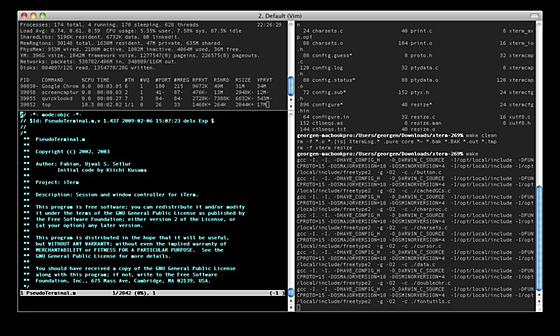
更新グラフ
バージョン履歴
iTerm2 3.7.5 (macOS 13+)
This is the recommended build for most users.
Built on October 14, 2026.
▸ Show Changelog
▾ Hide Changelog
Version 3.7.5 was built on October 14, 2026.
Credit to Nimanou (nuved) for the right-to-left
rendering, selection, and copy improvements in
this release.
Major New Features:
- Floating Panes: a pane that floats over a tab’s
split panes. Create one with Shell > New
Floating Pane with Current Profile, or with a
key binding or pointer action. Drag its title
bar to move it and its edges to resize it. Hold
Control while dragging to dock it into the split
panes or move it to another tab or window.
Window > Floating Panes can raise, dock, move
and hide them. They are saved with window
(省略されました)
This is the recommended build for most users.
Built on October 14, 2026.
▸ Show Changelog
▾ Hide Changelog
Version 3.7.5 was built on October 14, 2026.
Credit to Nimanou (nuved) for the right-to-left
rendering, selection, and copy improvements in
this release.
Major New Features:
- Floating Panes: a pane that floats over a tab’s
split panes. Create one with Shell > New
Floating Pane with Current Profile, or with a
key binding or pointer action. Drag its title
bar to move it and its edges to resize it. Hold
Control while dragging to dock it into the split
panes or move it to another tab or window.
Window > Floating Panes can raise, dock, move
and hide them. They are saved with window
(省略されました)
iTerm2 3.7.4 (macOS 13+)
This is the recommended build for most users.
Built on October 8, 2026.
▸ Show Changelog
▾ Hide Changelog
Version 3.7.4 of iTerm2 was built on October 8, 2026.
Bug Fixes:
- Fixed a crash that could recur every time
iTerm2 saved window state. Quitting while a
save was in progress could store duplicate
entries in the saved-state database, which
later saves could not handle.
- Fixed a crash when opening a new tab next to a
tab in a tab group.
- iTerm2 no longer crashes when its app was
moved, deleted, or replaced while running,
for example by an installer. It now explains
that the app is damaged and quits.
- Fixed a crash when exiting full screen in a
(省略されました)
This is the recommended build for most users.
Built on October 8, 2026.
▸ Show Changelog
▾ Hide Changelog
Version 3.7.4 of iTerm2 was built on October 8, 2026.
Bug Fixes:
- Fixed a crash that could recur every time
iTerm2 saved window state. Quitting while a
save was in progress could store duplicate
entries in the saved-state database, which
later saves could not handle.
- Fixed a crash when opening a new tab next to a
tab in a tab group.
- iTerm2 no longer crashes when its app was
moved, deleted, or replaced while running,
for example by an installer. It now explains
that the app is damaged and quits.
- Fixed a crash when exiting full screen in a
(省略されました)
iTerm2 3.7.3 (macOS 13+)
This is the recommended build for most users.
Built on September 22, 2026.
▸ Show Changelog
▾ Hide Changelog
Version 3.7.3 of iTerm2 was built on September 22, 2026.
Bug Fixes:
- Fixed the Python API not reporting OSC 8
hyperlinks. A cell’s CellStyle.url is now
populated, so scripts reading screen contents
can see the link target.
- Fixed the Screen setting in Settings >
Profiles > Window. Choosing “Main Screen”
left the popup blank and showed no checkmark
next to it when reopened, although the
setting was saved correctly.
- Fixed a crash when a program wrote a hyperlink
whose web address contained an emoji or other
character outside the Basic Multilingual
(省略されました)
This is the recommended build for most users.
Built on September 22, 2026.
▸ Show Changelog
▾ Hide Changelog
Version 3.7.3 of iTerm2 was built on September 22, 2026.
Bug Fixes:
- Fixed the Python API not reporting OSC 8
hyperlinks. A cell’s CellStyle.url is now
populated, so scripts reading screen contents
can see the link target.
- Fixed the Screen setting in Settings >
Profiles > Window. Choosing “Main Screen”
left the popup blank and showed no checkmark
next to it when reopened, although the
setting was saved correctly.
- Fixed a crash when a program wrote a hyperlink
whose web address contained an emoji or other
character outside the Basic Multilingual
(省略されました)
iTerm2 3.7.2 (macOS 13+)
This is the recommended build for most users.
Built on September 14, 2026.
▸ Show Changelog
▾ Hide Changelog
Version 3.7.2 was built on September 14, 2026.
Bug Fixes:
- Fixed a crash when editing a dynamic profile
whose file had been changed on disk.
- Fixed a crash when clicking the bookmark
button on a command in the terminal.
- Fixed a crash in the GPU renderer on macOS 26
caused by configuring the drawable timeout off
the main thread.
- Fixed a crash that could occur when quitting
iTerm2 while several Claude Code sessions were
running.
- Fixed a crash when attaching over tmux -CC to
a window whose panes are all floating, which
(省略されました)
This is the recommended build for most users.
Built on September 14, 2026.
▸ Show Changelog
▾ Hide Changelog
Version 3.7.2 was built on September 14, 2026.
Bug Fixes:
- Fixed a crash when editing a dynamic profile
whose file had been changed on disk.
- Fixed a crash when clicking the bookmark
button on a command in the terminal.
- Fixed a crash in the GPU renderer on macOS 26
caused by configuring the drawable timeout off
the main thread.
- Fixed a crash that could occur when quitting
iTerm2 while several Claude Code sessions were
running.
- Fixed a crash when attaching over tmux -CC to
a window whose panes are all floating, which
(省略されました)
iTerm2 3.7.1 (macOS 13+)
This is the recommended build for most users.
Built on September 10, 2026.
▸ Show Changelog
▾ Hide Changelog
Version 3.7.1 was built on September 10, 2026.
Improvements:
- Newlines embedded in a completion suggestion
(such as a command-history entry or file name)
now show as a return glyph so the entry stays
on one line instead of spilling across rows.
The value inserted when you accept the row is
unchanged.
Bug Fixes:
- Fixed a crash on launch when restoring saved
sessions that contained right-to-left text
written by version 3.6.11. This could force you
to discard all of your restored sessions.
- Fixed a memory leak where browser panes were
(省略されました)
This is the recommended build for most users.
Built on September 10, 2026.
▸ Show Changelog
▾ Hide Changelog
Version 3.7.1 was built on September 10, 2026.
Improvements:
- Newlines embedded in a completion suggestion
(such as a command-history entry or file name)
now show as a return glyph so the entry stays
on one line instead of spilling across rows.
The value inserted when you accept the row is
unchanged.
Bug Fixes:
- Fixed a crash on launch when restoring saved
sessions that contained right-to-left text
written by version 3.6.11. This could force you
to discard all of your restored sessions.
- Fixed a memory leak where browser panes were
(省略されました)
iTerm2 3.7.0 (macOS 13+)
This is the recommended build for most users.
Built on September 8, 2026.
▸ Show Changelog
▾ Hide Changelog
Version 3.7.0 was built on June 8, 2026
Major New Features:
- Companion App: a new iOS app, iTerm2 Buddy,
pairs with your Mac by scanning a QR code
(iTerm2 > Companion Device Settings) and
connects over an encrypted Noise channel so you
can interact with iTerm2 via AI chat from your
phone.
Devices connect through an encrypted relay, so
they work even when the Mac and phone are on
different
networks, and end-to-end encryption ensures that
your data is only visible to you.
First-time setup is now a guided wizard: it
(省略されました)
This is the recommended build for most users.
Built on September 8, 2026.
▸ Show Changelog
▾ Hide Changelog
Version 3.7.0 was built on June 8, 2026
Major New Features:
- Companion App: a new iOS app, iTerm2 Buddy,
pairs with your Mac by scanning a QR code
(iTerm2 > Companion Device Settings) and
connects over an encrypted Noise channel so you
can interact with iTerm2 via AI chat from your
phone.
Devices connect through an encrypted relay, so
they work even when the Mac and phone are on
different
networks, and end-to-end encryption ensures that
your data is only visible to you.
First-time setup is now a guided wizard: it
(省略されました)
iTerm2 3.6.11 (macOS 12.4+)
This is the recommended build for most users.
Built on June 2, 2026.
▸ Show Changelog
▾ Hide Changelog
Version 3.6.11 was built on June 2, 2026
- Fix a number of bugs that caused crashes.
- Update AI models.
You can use the following to verify the zip file on https://keybase.io/verify:
-----BEGIN PGP SIGNED MESSAGE-----
Hash: SHA256
36e78c5049560eaa8e122224f6652eb4b229c61cd5e7332d6d25b5c36f7398e7
-----BEGIN PGP SIGNATURE-----
iQIzBAEBCAAdFiEEoSV4Xzv7YY5VD+aYJiz+XnkavhsFAmofOroACgkQJiz+Xnka
vhtfbA//bMypr0WCAmB+nPDl9pG7tYn+UdmBeEtrPs8AgvrL8gRW/3vSs5+b0z/L
ihcGDSSUujSr6gZh92xmszoV7NRHj4Ko/b0eRH5V6/helzpGBBCiSBIn9TwqLVMv
vRinEbm7INmeIl80BHR+SdGhQayhjA5+2391dk/Fkn3l5gFCXpSXUiuTM2EYSG5l
d+e+nHhyFBj57Ru334JNUciuY4xwaJS4vTwaeIAYiPEN1ZjMGAg0GYuRF7yMUF2o
a+4vknznOY+gAhQBB++P6o9EBd+rAmv9cKuGafAfnajgYAFir+FJYSuRVKmn6Zb2
(省略されました)
This is the recommended build for most users.
Built on June 2, 2026.
▸ Show Changelog
▾ Hide Changelog
Version 3.6.11 was built on June 2, 2026
- Fix a number of bugs that caused crashes.
- Update AI models.
You can use the following to verify the zip file on https://keybase.io/verify:
-----BEGIN PGP SIGNED MESSAGE-----
Hash: SHA256
36e78c5049560eaa8e122224f6652eb4b229c61cd5e7332d6d25b5c36f7398e7
-----BEGIN PGP SIGNATURE-----
iQIzBAEBCAAdFiEEoSV4Xzv7YY5VD+aYJiz+XnkavhsFAmofOroACgkQJiz+Xnka
vhtfbA//bMypr0WCAmB+nPDl9pG7tYn+UdmBeEtrPs8AgvrL8gRW/3vSs5+b0z/L
ihcGDSSUujSr6gZh92xmszoV7NRHj4Ko/b0eRH5V6/helzpGBBCiSBIn9TwqLVMv
vRinEbm7INmeIl80BHR+SdGhQayhjA5+2391dk/Fkn3l5gFCXpSXUiuTM2EYSG5l
d+e+nHhyFBj57Ru334JNUciuY4xwaJS4vTwaeIAYiPEN1ZjMGAg0GYuRF7yMUF2o
a+4vknznOY+gAhQBB++P6o9EBd+rAmv9cKuGafAfnajgYAFir+FJYSuRVKmn6Zb2
(省略されました)
iTerm2 3.6.10 (macOS 12.4+)
This is the recommended build for most users.
Built on April 20, 2026.
▸ Show Changelog
▾ Hide Changelog
Version 3.6.10 was built on April 20, 2026.
Security:
- Harden SSH integration against
hypothetical in-band signaling abuse in
the conductor handshake and it2ssh
shutdown sequence.
New Features:
- Added support for Bitwarden as a password
manager.
- Added support for Keeper Security as a
password manager.
Bug Fixes:
- Fix a crash in the password manager when
copying a password.
(省略されました)
This is the recommended build for most users.
Built on April 20, 2026.
▸ Show Changelog
▾ Hide Changelog
Version 3.6.10 was built on April 20, 2026.
Security:
- Harden SSH integration against
hypothetical in-band signaling abuse in
the conductor handshake and it2ssh
shutdown sequence.
New Features:
- Added support for Bitwarden as a password
manager.
- Added support for Keeper Security as a
password manager.
Bug Fixes:
- Fix a crash in the password manager when
copying a password.
(省略されました)
iTerm2 3.6.9 (macOS 12.4+)
This is the recommended build for most users.
Built on March 10, 2026.
▸ Show Changelog
▾ Hide Changelog
Version 3.6.9 was built on March 10, 2026.
Bug Fixes:
- Fix a number of crashes.
- Fix rendering of Powerline chevron characters.
- Fix a bug where background colors were sometimes
incorrect.
You can use the following to verify the zip file on https://keybase.io/verify:
-----BEGIN PGP SIGNED MESSAGE-----
Hash: SHA256
27c00f476978c0a243144a0e03f01345facd0812ce4112fabaa54168c050b19e
-----BEGIN PGP SIGNATURE-----
iQIzBAEBCAAdFiEEoSV4Xzv7YY5VD+aYJiz+XnkavhsFAmmwgTUACgkQJiz+Xnka
vhtgLQ/+JHBTQSXs863hFGPpvohNy+fxpnI8XDOnX/cY+2KQYtXiAmjN8qWxy19R
gOVDZ/XEzmcm1SeqbTzpaYrDBOQA6dbJx4Mj+HtCoPIEmJwDRcMH+dFL/uEWZY0J
(省略されました)
This is the recommended build for most users.
Built on March 10, 2026.
▸ Show Changelog
▾ Hide Changelog
Version 3.6.9 was built on March 10, 2026.
Bug Fixes:
- Fix a number of crashes.
- Fix rendering of Powerline chevron characters.
- Fix a bug where background colors were sometimes
incorrect.
You can use the following to verify the zip file on https://keybase.io/verify:
-----BEGIN PGP SIGNED MESSAGE-----
Hash: SHA256
27c00f476978c0a243144a0e03f01345facd0812ce4112fabaa54168c050b19e
-----BEGIN PGP SIGNATURE-----
iQIzBAEBCAAdFiEEoSV4Xzv7YY5VD+aYJiz+XnkavhsFAmmwgTUACgkQJiz+Xnka
vhtgLQ/+JHBTQSXs863hFGPpvohNy+fxpnI8XDOnX/cY+2KQYtXiAmjN8qWxy19R
gOVDZ/XEzmcm1SeqbTzpaYrDBOQA6dbJx4Mj+HtCoPIEmJwDRcMH+dFL/uEWZY0J
(省略されました)
iTerm2 3.6.8 (macOS 12.4+)
This is the recommended build for most users.
Built on February 26, 2026.
▸ Show Changelog
▾ Hide Changelog
Version 3.6.8 was built on February 26, 2026.
Note that 3.6.7 was a short-lived release. Its
release notes can be found below.
Bug fixes:
- Fix a crash during app update.
- Fix a bug where the status bar was not visible
in full screen.
Release notes for version 3.6.7 follow:
Version 3.6.7 was built on February 19, 2026.
New Features:
- There is a new window style of "Centered".
- You can now switch 1password accounts in the
password manager using the ... menu next to the
search field.
(省略されました)
This is the recommended build for most users.
Built on February 26, 2026.
▸ Show Changelog
▾ Hide Changelog
Version 3.6.8 was built on February 26, 2026.
Note that 3.6.7 was a short-lived release. Its
release notes can be found below.
Bug fixes:
- Fix a crash during app update.
- Fix a bug where the status bar was not visible
in full screen.
Release notes for version 3.6.7 follow:
Version 3.6.7 was built on February 19, 2026.
New Features:
- There is a new window style of "Centered".
- You can now switch 1password accounts in the
password manager using the ... menu next to the
search field.
(省略されました)
iTerm2 3.6.7 (macOS 12.4+)
This is the recommended build for most users.
Built on February 20, 2026.
▸ Show Changelog
▾ Hide Changelog
Version 3.6.7 of iTerm2 was built on February 20, 2026.
New Features:
- There is a new window style of "Centered".
- You can now switch 1password accounts in the
password manager using the ... menu next to the
search field.
- Added profile settings to disable and configure
progress bars.
- Added support for macOS "text replacements".
- Added session archiving. You can manually or
automatically archive a session, which writes
a full-fidelity copy of it to disk.
- OSC 8 hyperlinks can take a target= parameter to
cause them to reuse an in-app browser.
(省略されました)
This is the recommended build for most users.
Built on February 20, 2026.
▸ Show Changelog
▾ Hide Changelog
Version 3.6.7 of iTerm2 was built on February 20, 2026.
New Features:
- There is a new window style of "Centered".
- You can now switch 1password accounts in the
password manager using the ... menu next to the
search field.
- Added profile settings to disable and configure
progress bars.
- Added support for macOS "text replacements".
- Added session archiving. You can manually or
automatically archive a session, which writes
a full-fidelity copy of it to disk.
- OSC 8 hyperlinks can take a target= parameter to
cause them to reuse an in-app browser.
(省略されました)
 RSS[全体]
 Tw[@softantenna]