 Clocker
詳細情報
| タイトル | Clocker |
|---|---|
| URL | https://github.com/n0shake/Clocker |
| バージョン | ver 26.12 |
| 更新日 | 2026/05/14 |
| 追加日 | 2016/03/05 |
| 種別 | フリーソフト / オープンソース(その他) |
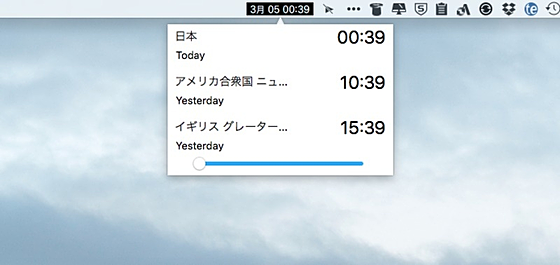
| 説明 | オープンソースのMac用世界時計。複数の都市の時間を一度に確認できる。 |
レビュー
概要
ClockerはAbhishek Banthiaが開発したmacOS向けのメニューバー常駐型タイムゾーン管理ツールです。2015年11月にプロジェクトが開始され、2016年3月に初版がリリースされました。異なるタイムゾーンに住む友人・同僚・チームメンバーの現地時刻を一目で把握することを目的として設計されており、macOSのメニューバーから手軽に複数の時刻を確認できます。Swift/Objective-Cで実装されたオープンソースプロジェクトとして開発が続いており、Intel・Apple Siliconのユニバーサルバイナリとして配布されています。MITライセンスで公開されており、広告なしで無料利用できます。
主要な特徴・機能
- メニューバー統合: macOSのメニューバーに常駐し、クリック一つで複数タイムゾーンの現地時刻を確認
- 複数タイムゾーン管理: 任意の都市・地域のタイムゾーンを追加して同時追跡
- GMT/UTCオフセット表示: 各タイムゾーンのオフセット情報をホバーで確認可能
- 広告なし: 完全に広告フリーのクリーンなUI
- ユニバーサルバイナリ: Intel MacとApple Silicon(M1以降)の両方でネイティブ動作
- 多言語対応: ウクライナ語を含む複数言語のUIローカライゼーションに対応
- Homebrewインストール対応:
brew install --cask clockerで簡単インストール可能 - 軽量動作: メニューバーユーティリティとして最適化された低リソース設計
対象ユーザー
- リモートチームのメンバーや管理者でグローバルなスケジュール調整が必要な方
- 異なる国・地域の同僚や友人と日常的にやり取りするユーザー
- 海外拠点との連携が多い企業・フリーランサー
- 複数タイムゾーンを素早く確認したいmacOSユーザー
ライセンス情報
MITライセンス のオープンソースソフトウェアです。無償で利用できます。GitHub(https://github.com/n0shake/Clocker)よりソースコードの取得・ビルドが可能です。macOS 14以降対応。
スクリーンショット
更新グラフ
バージョン履歴
New: Panel now opens 40ms quicker!
Fix: Calendar Event List not respecting timezone format preference
Fix: Unneeded horizontal elasticity in panel
Fix: Truncation in location name in the panel
Fix: Standard menubar mode doesn't respect user's selected calendars
New: Default to system theme for new users
Fix: Menubar icon missing when user doesn't have any timezone favorites
- Crash fix for File Logger deadlock
- Fixed: Restoring keyboard shortcuts for time scroller (h/t smwilsonau, bravopioneer)
- Fixed: Blurriness in non retina displays (h/t hbsmith)
- Fixed: Epoch time not updating
- Fixed: Cmd+, shortcut not working in floating mode
- New: Dot seperation in standard menubar mode
- New: Search Results for timezones handle typo(s)
Fix: False positive occlusion alerts when connected to external monitors or using clamshell mode
Tentative fix: Clocker terminating on idle
New: Ability to export / import Clocker preferences
New: Add timezones right from the panel
- Setup layer on the status bar container view to address frequent redrawing
- Setup conservative redraw policy
- New: Plenty of UX improvements to the slider, text sizing in the menubar, and table views
- New: Smaller window size for the panel
- Fix for crashes and missing icon for Copy option.
v22.07
- New: See GMT / UTC offset for timezones on hover
- New: Ukrainian translations
- New: Reduced font sizes
- Fix: Event ETA displayed in the menu-bar show correct times when event has just started
- Fix: Upcoming event cells in the panel aren't truncated
- Fix: "Copy All Times" not taking the slider into account
v22.06
- Granular time info in the upcoming event view
- Fixes missing support for Apple Silicon
- Fixes bug with "Include Day" option for menubar timezones
v22.05
- Support for viewing upcoming calendar item in Compact Menubar mode
- New "Solarized Dark" theme!
- New "FAQs" option accessible through the "…" button in the main panel
- Fixes bug with theme-switching when "System" theme mode is chosen
v22.02.01
- Clocker now is built as an universal binary
- Copy All Times now sorts by date
- Modern Slider Future Day Range is now adjustable
- Localized in Turkish, Arabic and a bit in Polish
 RSS[全体]
 Tw[@softantenna]