 BookMacster
詳細情報
| タイトル | BookMacster |
|---|---|
| URL | https://www.sheepsystems.com/ |
| バージョン | ver 3.3.9 |
| 更新日 | 2026/08/19 |
| 追加日 | 2024/01/15 |
| 種別 | シェアウェア(24.95ドル) |
| 説明 | Mac用のブックマーク管理ソフト。 |
レビュー
BookMacsterはPCやタブレット端末、スマートフォンのウェブブラウザ(Firefox、Chrome、Vivaldi、Operaなど)のブックマークを同期して管理することができるブックマークツール。
iCloudのSafariブックマーク、Firefox Sync、Google Chrome Sync、Vivaldi Sync、Opera Syncとの互換性を保つように設計されている。
以下のような特徴を持っている:
- Safari、 Firefox、Google Chrome、Vivaldi、Chromium、Chrome Canary、FirefoxDeveloperEdition、Brave Browserの間で継続的に同期することができる。
- iCab、Opera、OmniWeb、Epic、Roccatのブラウザが終了すると自動的に同期することができる。
- Pinboard、Delicious、Diigoと手動で同期。
- タグ、階層、またはその両方を使って簡単に整理できる。
- iCloud Firefox Sync、Chrome Sync、Vivald's Sync、Opera Syncと連携できるように設計されている。
- ブックマークを確認し、リダイレクトを修正できる。
- 重複の検索と削除。
- 安全でないブックマークをhttps://に。
- GoogleトラッキングタグのようなURL Cruftを削除する。
- ブックマークが変更されると自動的にソート(アルファベット順)。 ソートするフォルダ、ソートしないフォルダ、ソート方法をコントロールできる。
- FirefoxとChromeの複数のユーザープロファイルに対応。
- NetNewsWireや同様のアプリから新しいブックマークを収集するスクリプトが可能。
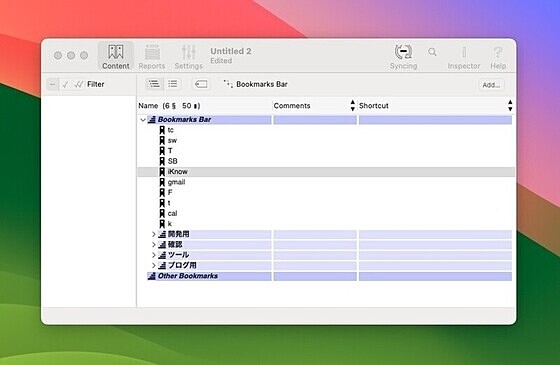
スクリーンショット
更新グラフ
バージョン履歴
Version 3.3.9 (2026-08-18)
No longer works in macOS 11. Now requires macOS 12 or later.
We’ve added support for so many web browsers this year that the Export Exclusions list in the Inspector Window needed a scroller to show all of them. That scroller is now in place.
Now pre-encodes apostrophe (') characters in URLs when exporting to Chrome-ish browsers. This eliminates churn for users who have such bookmarks. The churn started recently due to a change in these browsers.
In the Inspector window, bottom collapsible URLs area, repositioned some graphics which have been misplaced in recent versions due to changes in Apple’s build tools.
No longer works in macOS 11. Now requires macOS 12 or later.
We’ve added support for so many web browsers this year that the Export Exclusions list in the Inspector Window needed a scroller to show all of them. That scroller is now in place.
Now pre-encodes apostrophe (') characters in URLs when exporting to Chrome-ish browsers. This eliminates churn for users who have such bookmarks. The churn started recently due to a change in these browsers.
In the Inspector window, bottom collapsible URLs area, repositioned some graphics which have been misplaced in recent versions due to changes in Apple’s build tools.
Version 3.3.8 (2026-05-13)
Added support for import, export and syncing with the Dia web browser.
Added support for import, export and syncing with the Dia web browser.
Version 3.3.7 (2026-04-29)
Added support for import, export and syncing with the Helium web browser.
Added support for import, export and syncing with the Helium web browser.
Version 3.3.6 (2026-02-12)
Added support for import, export and syncing with the ChatGPT Atlas web browser.
Version 3.3.5 (2026-02-07)
Added support for import, export and syncing with the Comet web browser.
Fixed bug: Dragging multiple bookmarks to a tag did not tag all of the bookmarks.
Fixed bug: When user selected multiple tags in the Tag Cloud (RPTokenControl), then begins a drag, all tags except the last tag which was selected become deselected.
Added support for import, export and syncing with the ChatGPT Atlas web browser.
Version 3.3.5 (2026-02-07)
Added support for import, export and syncing with the Comet web browser.
Fixed bug: Dragging multiple bookmarks to a tag did not tag all of the bookmarks.
Fixed bug: When user selected multiple tags in the Tag Cloud (RPTokenControl), then begins a drag, all tags except the last tag which was selected become deselected.
Version 3.3.4 (2026-02-06)
Added support for import, export and syncing with Zen Browser.
Version 3.3.3 (2026-01-17)
Icons in Preferences > Appearance > Colors display properly when user is in Dark Mode now.
Added AppleScript commands to enable and disable undo registration, necessary to reduce memory bloat when running long scripts.
Added support for import, export and syncing with Zen Browser.
Version 3.3.3 (2026-01-17)
Icons in Preferences > Appearance > Colors display properly when user is in Dark Mode now.
Added AppleScript commands to enable and disable undo registration, necessary to reduce memory bloat when running long scripts.
Version 3.3.2 (2026-01-03)
Fixed a bug which caused a crash when certain errors occurred while searching for crufty files or app versions, which our apps do in the background shortly after being launched.
Fixed a bug which caused, when configuring a new Diigo or Pinboard client, switching on the Save password to my macOS Keychain checkbox to in fact not do that.
To prevent later crashes or import/export failures, now automatically removes any invisible control characters when storing bookmark names.
Better error reporting in case the messaging host of one of our web browser extensions receives undecodeable data during an Import or Export operation.
Version 3.3.1 (2025-09-12)
In the document window > Now works with the latest version of Opera, no more Error 594520. (Opera has corrected the index values for the first-level children in their bookmarks tree.)
In the document window > Content tab, restored images to the “Outline Mode / Table Mode” button which somehow got deleted in version 3.3.
In the Manage Browser Extensions window, fixed alignment of Version and Status indicators along the right edge, which were improperly displaced in version 3.3.
Fixed a bug which caused a crash when certain errors occurred while searching for crufty files or app versions, which our apps do in the background shortly after being launched.
Fixed a bug which caused, when configuring a new Diigo or Pinboard client, switching on the Save password to my macOS Keychain checkbox to in fact not do that.
To prevent later crashes or import/export failures, now automatically removes any invisible control characters when storing bookmark names.
Better error reporting in case the messaging host of one of our web browser extensions receives undecodeable data during an Import or Export operation.
Version 3.3.1 (2025-09-12)
In the document window > Now works with the latest version of Opera, no more Error 594520. (Opera has corrected the index values for the first-level children in their bookmarks tree.)
In the document window > Content tab, restored images to the “Outline Mode / Table Mode” button which somehow got deleted in version 3.3.
In the Manage Browser Extensions window, fixed alignment of Version and Status indicators along the right edge, which were improperly displaced in version 3.3.
Version 3.3 (2025-09-09)
New app icon and other cosmetic repairs for compatibility with macOS 26 Tahoe.
New app icon and other cosmetic repairs for compatibility with macOS 26 Tahoe.
Version 3.2 (2025-07-11)
Now supports imports and exports with the *Opera Air web browser.
Imports from the current version of Opera now land in the correct folder in your Collection.
Now supports imports and exports with the *Opera Air web browser.
Imports from the current version of Opera now land in the correct folder in your Collection.
Version 3.1.9 (2025-04-01)
Now recovers gracefully if a Chrome-ish profile folder is missing.
The Delete All Content function no longer deletes hard folders, which caused errors to occur later.
Now recovers gracefully if a Chrome-ish profile folder is missing.
The Delete All Content function no longer deletes hard folders, which caused errors to occur later.
Version 3.1.8 (2024-10-28)
Fixed a bug which caused a crash that was introduced in verrsion 3.1.7 and modernized more old code. (Date from browser extensions to main app is no lnger encoded with NSKeyedArchiver.)
Fixed a bug which caused a crash that was introduced in verrsion 3.1.7 and modernized more old code. (Date from browser extensions to main app is no lnger encoded with NSKeyedArchiver.)
Version 3.1.7 (2024-10-14)
 RSS[全体]
 Tw[@softantenna]