 Arcmark
詳細情報
| タイトル | Arcmark |
|---|---|
| URL | https://github.com/Geek-1001/arcmark |
| バージョン | ver 0.1.14 |
| 更新日 | 2026/06/13 |
| 追加日 | 2026/02/20 |
| 種別 | フリーソフト |
| 説明 | あらゆるブラウザに「貼り付く」macOS向けブックマークマネージャー |
レビュー
概要
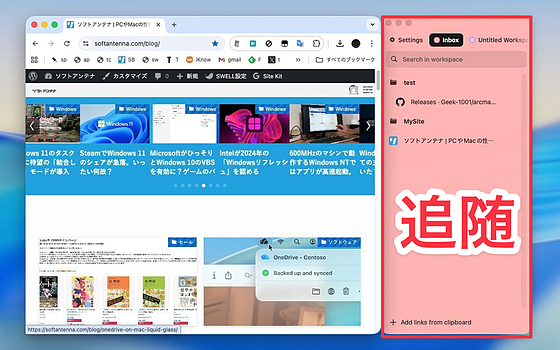
Arcmark は、Swift と AppKit で構築されたネイティブ macOS 向けブックマークマネージャーです。Arc ブラウザのサイドバーによるタブ整理スタイルに着想を得て、「Arc 以外のブラウザでも同様の体験を実現したい」というモチベーションから開発されました。ブラウザウィンドウにサイドバーとして付着(アタッチ)し、あらゆるブラウザと組み合わせて使えるのが特徴です。ブックマークはローカルに JSON 形式で保存され、クラウドへの送信なしにプライベートに管理できます。2026年3月時点で ver 0.1.8 が公開されています。
主要な特徴・機能
- あらゆるブラウザに対応 – Chrome・Arc・Safari・Brave・Firefox・Helium など主要ブラウザにサイドバーとして付着して動作
- ブラウザプロファイル対応 – Chrome・Firefox・Helium のプロファイル切り替えに対応
- ワークスペース管理 – 複数のブックマークコレクションをカスタムカラーで整理し、キーボードショートカットで素早く切り替え
- 階層型フォルダ – ネストされたフォルダ構造をドラッグ&ドロップで直感的に操作
- フォルダから複数リンクを一括オープン – フォルダ内のリンクをまとめてブラウザで開く機能
- Chrome ブックマークのインポート – 既存の Chrome ブックマークを Arcmark に取り込める
- ローカル保存 –
~/Library/Application Support/Arcmark/data.jsonにデータを保存、プライバシーに配慮した設計 - ウィンドウ位置の記憶 – 前回のウィンドウ位置を復元
対象ユーザー
- Arc ブラウザのサイドバー整理方式を気に入っていたが他ブラウザに移行したユーザー
- 複数ブラウザをまたいでブックマークを一元管理したい macOS ユーザー
- ワークスペースごとにリンクを整理してプロジェクト管理に活かしたいユーザー
- クラウド同期不要でローカルにブックマークを保存したいプライバシー重視のユーザー
ライセンス情報
MIT ライセンスのもとでオープンソースとして公開。ソースコードは GitHub 上で公開されており、自由に利用・改変・再配布が可能。
スクリーンショット
更新グラフ
バージョン履歴
Arcmark v0.1.14
- Added local backup system for the main data.json file
- Fixed note editor resource lookup crash
Arcmark v0.1.12
What's new?
Create Notes:
You can now create local Markdown files (aka notes) from ArcMark and edit them directly in the browser. Everything is local-first; newly added files can be organised exactly the same way as you organise your links.
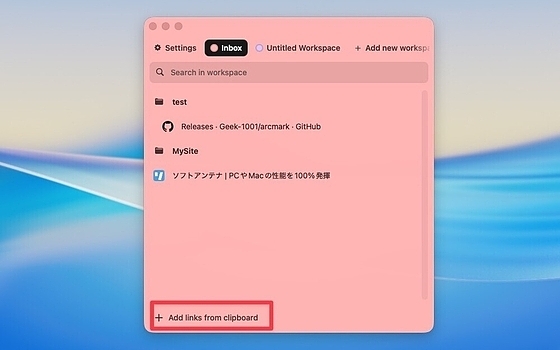
You can even create a new note by copying some text into the clipboard and clicking "Add links from clipboard". ArcMark will detect that you only have plain text and, instead of saving a link, it will create a new note.
Agent Skills:
Install the ArcMark skill and manage every workspace and link directly from your AI agent of choice. The skill is bundled with a minimal script that talks to ArcMark and lets your agent use the app just as you would.
Reminders:
Resurface links in the future by setting a reminder date. Reminders are always shown at the top
Arcmark v0.1.10
Fixes:
- When the Arcmark window is in attachment mode and is also hidden, it no longer captures gesture events.
- Fixed a bug where the Arcmark window would break the focus for other windows when switching between apps using Command+Tab.
Arcmark v0.1.9
New:
- Added horizontal swipe gesture to switch workspaces. It's off by default and can be enabled from Settings.
- Added the ability to set a custom favicon for saved links. Select emoji, generic icons, or set the favicon from previously saved websites.
Fixes:
- Hide tooltip during drag-and-drop reordering.
- Group selected links into a folder at their common parent level.
- Improve label truncation width in links on hover state.
Arcmark v0.1.8
- Added support for the experimental browser profile in Helium browser. You can now map the workspace in Arcmar to the Helium profile, and all links from this workspace will open in that profile.
- Added keyboard shortcuts to navigate between workspace in ArcMark (⌥⌘← / ⌥⌘→)
- Added an automatic fallback for the sidebar position. Now, if there isn't enough space for the attached sidebar on the selected side, it will temporarily move to the opposite side to remain accessible.
- Added a custom URL tooltip on link hover. It can be disabled from the settings.
- Fixed URL text field wrapping in edit alert dialog
Arcmark v0.1.7
- Added experimental support for separate profiles in Chrome and Firefox. You can now set a custom profile from the Settings page when hovering over a workspace name. Once you do, all links in that workspace will be opened in the specific profile.
- Added 'Open All Links' context menu action for folders to open multiple links at once. It also works when you select multiple links while holding the CMD key.
- Restore window size and position on relaunch.
- Fix support for multi-window attachment for the same browsers. Now the app should correctly transition between all active windows of a selected browser.
Arcmark v0.1.6
- Fixed auto-update mismatch issue
Arcmark v0.1.4
What's Changed
- Add folder transfer between workspaces
- Add top/bottom overscroll shadows to workspace items list
- Add Chrome bookmarks import feature
Other Improvements
- Fix Sparkle update failure: patch SUPublicEDKey from Bundler.toml
- Add landing page for Arcmark
- Update release script to sync landing page download link
 RSS[全体]
 Tw[@softantenna]