 Tower for Mac
詳細情報
| タイトル | Tower for Mac |
|---|---|
| URL | https://www.git-tower.com/ |
| バージョン | ver 18.0-564 |
| 更新日 | 2026/10/07 |
| 追加日 | 2016/02/11 |
| 種別 | シェアウェア(79ドル) |
| 説明 | Mac用の高機能なGit GUIクライアント。 |
レビュー
概要
Tower for Mac は、fournova Software GmbH が開発・販売している macOS/Windows 向けの高機能 Git GUI クライアントです。2010年のリリース以来15年以上の歴史を持ち、10万人以上の開発者・デザイナーに利用されています。コマンドラインに不慣れなユーザーでも Git の高度な機能を直感的に使えるようにすることを目指して設計されており、ドラッグ&ドロップやアンドゥ(取り消し)機能など、GUI クライアントとしての使いやすさを追求しています。最新の Mac 版はバージョン 15.1(2026年2月リリース)で、Apple Silicon(ARM)プロセッサにも対応しています。
主要な特徴・機能
- ドラッグ&ドロップ操作 – インタラクティブリベースや変更のステージングをドラッグ&ドロップで直感的に実行
- Undo 機能 – Cmd+Z でほぼすべての Git 操作を取り消し可能で、ミスを恐れずに作業できる
- プルリクエスト管理 – GitHub・GitLab・Bitbucket に対応したプルリクエストの作成・管理
- Git LFS 対応 – 大容量ファイルの管理に使われる Git Large File Storage をサポート
- Git Flow 対応 – ブランチ戦略 Git Flow のワークフローを GUI から操作可能
- サブモジュール対応 – Git サブモジュールの管理をグラフィカルに実行
- ファイル履歴・Blame 機能 – ファイルの変更履歴や各行の最終変更者を視覚的に確認
- コミットテンプレート – チームで統一したコミットメッセージのテンプレートを設定可能
- Apple Silicon 対応 – ARM プロセッサを搭載した Mac に最適化
対象ユーザー
- Git をコマンドラインなしに GUI で効率的に操作したい開発者・デザイナー
- チームでの Git ワークフロー(Git Flow、プルリクエスト)を体系的に管理したいエンジニアチーム
- 大規模プロジェクトでのブランチ・マージ・リベース操作を視覚的に把握したい上級ユーザー
- Git を学び始めた学生や Git 初心者
ライセンス情報
シェアウェア(有料)。Basic プランが $69/年、Pro プランが $99/年のサブスクリプション制。30日間の無料トライアルあり。学生向けの割引ライセンスも提供。
スクリーンショット
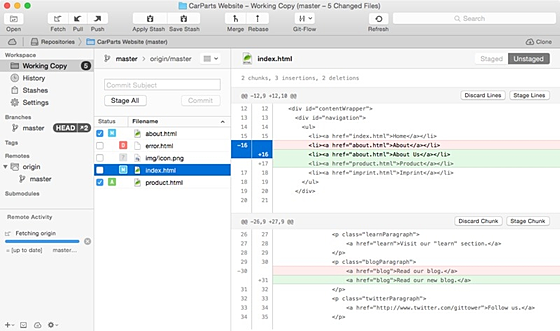
更新グラフ
バージョン履歴
Tower 18 for Mac – A Better Command Line Experience
14.1
Released Oct 06, 2026
Download (x64) for Windows 10+
Download (ARM) for Windows 10+
Copy SHA1 checksum (x64)
Download MSI (x64)
Copy MSI SHA1 checksum (x64)
Copy SHA1 checksum (ARM64)
Download MSI (ARM64)
Copy MSI SHA1 checksum (ARM64)
Version 18
Highlights
Release Notes
Tower 18 for Mac supercharges the Tower Command Line Tool: jump from your terminal straight to History, Blame, the Working Copy, Branches Review, and more — with a single command!
The command line tool now also stays up to date automatically with every Tower update, and our new Agent Skill lets you simply ask your AI agent to "show me this in Tower".
Jump to Any View from the Terminal
Review Your AI Agent's Work
Your AI agent has just finished its work? Type gittower working-copy (or gittower status) to review the changes in a proper diff view before anything gets committed.
(省略されました)
14.1
Released Oct 06, 2026
Download (x64) for Windows 10+
Download (ARM) for Windows 10+
Copy SHA1 checksum (x64)
Download MSI (x64)
Copy MSI SHA1 checksum (x64)
Copy SHA1 checksum (ARM64)
Download MSI (ARM64)
Copy MSI SHA1 checksum (ARM64)
Version 18
Highlights
Release Notes
Tower 18 for Mac supercharges the Tower Command Line Tool: jump from your terminal straight to History, Blame, the Working Copy, Branches Review, and more — with a single command!
The command line tool now also stays up to date automatically with every Tower update, and our new Agent Skill lets you simply ask your AI agent to "show me this in Tower".
Jump to Any View from the Terminal
Review Your AI Agent's Work
Your AI agent has just finished its work? Type gittower working-copy (or gittower status) to review the changes in a proper diff view before anything gets committed.
(省略されました)
Tower 17 for Mac – Smarter "Fully Merged" Detection
Learn More
Tower 14 for Windows – Branches Review
Learn More
Version 14
Highlights
Release Notes
Tower 14 for Windows brings a bird's-eye view of every branch in your repository with the new Branches Review view, plus a much smarter "Fully Merged" detection that finally catches squash and rebase merges.
Branches Review
Smarter "Fully Merged" Detection
View Customization
The gear menu in the sidebar footer now collects all its display settings in one place, with dedicated filter settings for remote branches and tags.
While inspecting a file diff, the footer on the right also keeps three controls within reach: the context lines shown around each change, a toggle for whitespace-only changes, and a "Complete File" view.
14.0
Released Sep 15, 2026
Download (x64) for Windows 10+
Download (ARM) for Windows 10+
Copy SHA1 checksum (x64)
Download MSI (x64)
(省略されました)
Learn More
Tower 14 for Windows – Branches Review
Learn More
Version 14
Highlights
Release Notes
Tower 14 for Windows brings a bird's-eye view of every branch in your repository with the new Branches Review view, plus a much smarter "Fully Merged" detection that finally catches squash and rebase merges.
Branches Review
Smarter "Fully Merged" Detection
View Customization
The gear menu in the sidebar footer now collects all its display settings in one place, with dedicated filter settings for remote branches and tags.
While inspecting a file diff, the footer on the right also keeps three controls within reach: the context lines shown around each change, a toggle for whitespace-only changes, and a "Complete File" view.
14.0
Released Sep 15, 2026
Download (x64) for Windows 10+
Download (ARM) for Windows 10+
Copy SHA1 checksum (x64)
Download MSI (x64)
(省略されました)
13.2
Released Aug 18, 2026
Download (x64) for Windows 10+
Download (ARM) for Windows 10+
Copy SHA1 checksum (x64)
Download MSI (x64)
Copy MSI SHA1 checksum (x64)
Copy SHA1 checksum (ARM64)
Download MSI (ARM64)
Copy MSI SHA1 checksum (ARM64)
17.2
Released Sep 14, 2026
Download for macOS 14.0+
Copy MD5 checksum (x64)
Released Aug 18, 2026
Download (x64) for Windows 10+
Download (ARM) for Windows 10+
Copy SHA1 checksum (x64)
Download MSI (x64)
Copy MSI SHA1 checksum (x64)
Copy SHA1 checksum (ARM64)
Download MSI (ARM64)
Copy MSI SHA1 checksum (ARM64)
17.2
Released Sep 14, 2026
Download for macOS 14.0+
Copy MD5 checksum (x64)
Join Beta Channel
17.1.1
Released Aug 11, 2026
Download for macOS 14.0+
Copy MD5 checksum (x64)
Download for macOS 14.0+
17.1.1
Released Aug 11, 2026
Download for macOS 14.0+
Copy MD5 checksum (x64)
Download for macOS 14.0+
Tower Pro
Stacked Branches
Supercharged workflows
Custom Workflows
Start and finish instantly
Graphite Support
Code review at scale
Branch Cleanup
Cut through the branch noise
Self-Hosted Repos
Connect your own server
Merge Detection
Catch merges Git can't see
Pricing
Support
Learn Git
Video Course
24 episodes
Online Book
(省略されました)
Stacked Branches
Supercharged workflows
Custom Workflows
Start and finish instantly
Graphite Support
Code review at scale
Branch Cleanup
Cut through the branch noise
Self-Hosted Repos
Connect your own server
Merge Detection
Catch merges Git can't see
Pricing
Support
Learn Git
Video Course
24 episodes
Online Book
(省略されました)
Tower 17 for Mac is now in Beta!
Tower 13 for Windows – Branch Pinning & Automatic Branch Management
Version 13
Highlights
Release Notes
You'll also find new "Fully Merged" and "Stale" badges in the sidebar, making it easy to spot branches that are ready to be cleaned up.
Branch Pinning
Right-click a branch to pin it. Pinned branches appear in a dedicated "Pinned" section at the top of the sidebar, so your most important branches are always within reach.
New "Fully Merged" and "Stale" Badges
New badges next to branches indicate whether a branch is Fully Merged (all commits integrated into its parent, with the remote branch deleted) or how long it's been Stale.
Automatic Branch Management
Add branches to the new "Archived Branches" view manually, or let Tower identify and archive stale or fully merged branches for you automatically.
13.1
Released Jul 16, 2026
Download (x64) for Windows 10+
Download (ARM) for Windows 10+
Copy SHA1 checksum (x64)
Download MSI (x64)
Copy MSI SHA1 checksum (x64)
(省略されました)
Tower 13 for Windows – Branch Pinning & Automatic Branch Management
Version 13
Highlights
Release Notes
You'll also find new "Fully Merged" and "Stale" badges in the sidebar, making it easy to spot branches that are ready to be cleaned up.
Branch Pinning
Right-click a branch to pin it. Pinned branches appear in a dedicated "Pinned" section at the top of the sidebar, so your most important branches are always within reach.
New "Fully Merged" and "Stale" Badges
New badges next to branches indicate whether a branch is Fully Merged (all commits integrated into its parent, with the remote branch deleted) or how long it's been Stale.
Automatic Branch Management
Add branches to the new "Archived Branches" view manually, or let Tower identify and archive stale or fully merged branches for you automatically.
13.1
Released Jul 16, 2026
Download (x64) for Windows 10+
Download (ARM) for Windows 10+
Copy SHA1 checksum (x64)
Download MSI (x64)
Copy MSI SHA1 checksum (x64)
(省略されました)
12.4
Released Jun 15, 2026
Download (x64) for Windows 10+
Download (ARM) for Windows 10+
Copy SHA1 checksum (x64)
Download MSI (x64)
Copy MSI SHA1 checksum (x64)
Copy SHA1 checksum (ARM64)
Download MSI (ARM64)
Copy MSI SHA1 checksum (ARM64)
FixedAuthentication: Bitbucket no longer prompts you to re-authenticate on fetch/push/pull — OAuth tokens now refresh silently and stored credentials are reused.
12.3
Released Jun 09, 2026
Download (x64) for Windows 10+
Download (ARM) for Windows 10+
Copy SHA1 checksum (x64)
Download MSI (x64)
Copy MSI SHA1 checksum (x64)
Copy SHA1 checksum (ARM64)
(省略されました)
Released Jun 15, 2026
Download (x64) for Windows 10+
Download (ARM) for Windows 10+
Copy SHA1 checksum (x64)
Download MSI (x64)
Copy MSI SHA1 checksum (x64)
Copy SHA1 checksum (ARM64)
Download MSI (ARM64)
Copy MSI SHA1 checksum (ARM64)
FixedAuthentication: Bitbucket no longer prompts you to re-authenticate on fetch/push/pull — OAuth tokens now refresh silently and stored credentials are reused.
12.3
Released Jun 09, 2026
Download (x64) for Windows 10+
Download (ARM) for Windows 10+
Copy SHA1 checksum (x64)
Download MSI (x64)
Copy MSI SHA1 checksum (x64)
Copy SHA1 checksum (ARM64)
(省略されました)
12.1
Released May 14, 2026
Download (x64) for Windows 10+
Download (ARM) for Windows 10+
Copy SHA1 checksum (x64)
Download MSI (x64)
Copy MSI SHA1 checksum (x64)
Copy SHA1 checksum (ARM64)
Download MSI (ARM64)
Copy MSI SHA1 checksum (ARM64)
16.0.1
Released May 20, 2026
Download for macOS 12.0+
Copy MD5 checksum (x64)
Released May 14, 2026
Download (x64) for Windows 10+
Download (ARM) for Windows 10+
Copy SHA1 checksum (x64)
Download MSI (x64)
Copy MSI SHA1 checksum (x64)
Copy SHA1 checksum (ARM64)
Download MSI (ARM64)
Copy MSI SHA1 checksum (ARM64)
16.0.1
Released May 20, 2026
Download for macOS 12.0+
Copy MD5 checksum (x64)
Skip to main content
Tower 16 for Mac – Introducing AI Commits
Learn More
Tower 12 for Windows – Custom Git Workflows
Learn More
Version 12
Highlights
Release Notes
Tower 12 allows you to create custom Git workflows, enabling you to establish and enforce the exact workflow that meets your project's needs.
Select your Workflow
Choose from predefined options such as GitFlow or GitHub/GitLab Flow, other workflows like Graphite or GitFlow CLI, or create any custom Git workflow entirely from scratch.
Branch Workflow Configuration
You can define trunk, base, and topic branches, as well as set upstream/downstream merge strategies and various other options.
Day-to-Day Workflow Guidance
Once your workflow is configured, Tower guides you through the day-to-day: starting features, finishing branches, and keeping everything up to date.
It even warns you when a parent branch has new commits you should integrate.
12.0
Released Apr 29, 2026
Download (x64) for Windows 10+
(省略されました)
Tower 16 for Mac – Introducing AI Commits
Learn More
Tower 12 for Windows – Custom Git Workflows
Learn More
Version 12
Highlights
Release Notes
Tower 12 allows you to create custom Git workflows, enabling you to establish and enforce the exact workflow that meets your project's needs.
Select your Workflow
Choose from predefined options such as GitFlow or GitHub/GitLab Flow, other workflows like Graphite or GitFlow CLI, or create any custom Git workflow entirely from scratch.
Branch Workflow Configuration
You can define trunk, base, and topic branches, as well as set upstream/downstream merge strategies and various other options.
Day-to-Day Workflow Guidance
Once your workflow is configured, Tower guides you through the day-to-day: starting features, finishing branches, and keeping everything up to date.
It even warns you when a parent branch has new commits you should integrate.
12.0
Released Apr 29, 2026
Download (x64) for Windows 10+
(省略されました)
Tower turns 15 🎉 30% off until March 1st
USE CODE SAVE30
Version 11
Highlights
Release Notes
Tower 11 introduces support for Commit Templates, allowing you to easily manage and insert your own templates for writing better commit messages. Starting with this release, we will also offer an ARM version of Tower!
Managing Commit Templates
To manage your templates, go to the new "Templates" tab in the Preferences.
Inserting Commit Templates
When you're ready to create a commit, use the new "Commit template" button to access all your saved templates.
Native ARM Version
If you have a Windows device equipped with an ARM processor, you can now benefit from a faster and more energy-efficient experience. This native ARM version guarantees that Tower operates at optimal performance on these devices.
11.1
Released Feb 03, 2026
Download (x64) for Windows 10+
Download (ARM) for Windows 10+
Copy SHA1 checksum (x64)
Download MSI (x64)
Copy MSI SHA1 checksum (x64)
(省略されました)
USE CODE SAVE30
Version 11
Highlights
Release Notes
Tower 11 introduces support for Commit Templates, allowing you to easily manage and insert your own templates for writing better commit messages. Starting with this release, we will also offer an ARM version of Tower!
Managing Commit Templates
To manage your templates, go to the new "Templates" tab in the Preferences.
Inserting Commit Templates
When you're ready to create a commit, use the new "Commit template" button to access all your saved templates.
Native ARM Version
If you have a Windows device equipped with an ARM processor, you can now benefit from a faster and more energy-efficient experience. This native ARM version guarantees that Tower operates at optimal performance on these devices.
11.1
Released Feb 03, 2026
Download (x64) for Windows 10+
Download (ARM) for Windows 10+
Copy SHA1 checksum (x64)
Download MSI (x64)
Copy MSI SHA1 checksum (x64)
(省略されました)
15.0.3
Released Dec 19, 2025
Download for macOS 12.0+
Copy MD5 checksum
Released Dec 19, 2025
Download for macOS 12.0+
Copy MD5 checksum
 RSS[全体]
 Tw[@softantenna]