Pika
詳細情報
| タイトル | Pika |
|---|---|
| URL | https://github.com/superhighfives/pika |
| バージョン | ver 1.4.1-beta4 |
| 更新日 | 2026/03/15 |
| 追加日 | 2024/01/17 |
| 種別 | フリーソフト / オープンソース(MIT) |
| 説明 | 使いやすいオープンソースのmacOS用ネイティブカラーピッカー。 |
レビュー
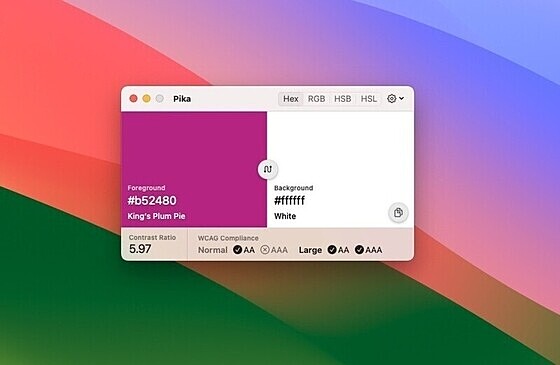
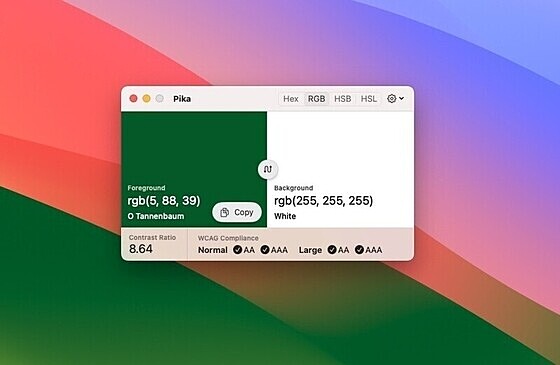
PikaはmacOS用のオープンソースのカラーピッカー。
デスクトップ画面上に存在する色を指定すると、その色がピックアップされ、色コードをHex、RGB、HSB、HSLなどの形式でコピーすることができる。
グローバルショートカットキーの割り当て機能も搭載。
スクリーンショット
更新グラフ
バージョン履歴
Beta 4 brings color history — a persistent timeline of every color pair you've picked, so you can pick freely without worrying about losing a combination you loved.
As always, cheers for the support, and if you have any issues or feedback, let me know on GitHub.
New features
- Color history — Pika now keeps a scrollable history of up to 20 color pairs. Every time you pick a new color, it's automatically saved. Open the history drawer with H to browse your past picks as color chips, each showing the foreground and background together. Click any chip to restore both colors instantly, or right-click to apply just the foreground or background individuall
A small bug fix beta addressing colour values not updating when switching colour spaces in preferences.
As always, cheers for the support, and if you have any issues or feedback, let me know on GitHub.
Updates and bug fixes
- Colour space reactivity: Colour values now update immediately when changing the colour space preference, rather than requiring a hover to trigger a refresh.
This beta fixes an issue where picked colours could be inaccurate by a few values, depending on your display's colour profile.
As always, cheers for the support, and if you have any issues or feedback, let me know on GitHub.
Updates and bug fixes
- Improved colour accuracy — Pika now normalises all picked colours to sRGB immediately, fixing a bug where hex values could drift by 1–3 channels on wide-gamut displays (fixes #187)
Pika 1.4.1-beta1 is a maintenance release focused on code quality, improved animations, and better formatting across the board.
As always, cheers for the support, and if you have any issues or feedback, let me know on GitHub.
Updates and bug fixes
- Smoother hover animations — Improved button expand/collapse animations with cooldown and cancellation guards to prevent flicker
- Better OKLCH precision — Reduced chroma decimal places from 4 to 3 for cleaner output
- Improved LAB formatting — Added proper spacing to unformatted LAB output and fixed closing parenthesis formatting
- Code quality improvements
Pika 1.4.0 adds OKLCH as a brand new color format, along with a more compact UI for switching between formats.
As always, cheers for the support, and if you have any issues or feedback, let me know on GitHub.
New features
- OKLCH color format — Added OKLCH (Oklab cylindrical) as the 7th color format option, with full sRGB → Linear RGB → LMS → Oklab → OKLCH conversion pipeline
- Compact format picker — Replaced the segmented format picker with a dropdown menu to accommodate the additional format
Updates and bug fixes
- Smaller minimum window width — Reduced from 570 to 480, taking advantage of the more compact picker
- Improved color space accuracy — Force sRGB color space in OKLCH
This beta fixes the toolbar format dropdown being clipped in the title bar, along with all the fixes from beta2.
As always, cheers for the support, and if you have any issues or feedback, let me know on GitHub.
Updates and bug fixes
- Toolbar dropdown clipping — Fixed the format picker and gear menu being cut off in the window title bar
- Format dropdown — Fixed the format picker in the toolbar truncating longer format names like OpenGL
- OKLCH and LAB color accuracy — Fixed incorrect color values when using non-sRGB color spaces like Display P3 or Adobe RGB
- Keyboard shortcut labels — Fixed swapp
This beta brings improvements to the new format dropdown and fixes for OKLCH color math.
As always, cheers for the support, and if you have any issues or feedback, let me know on GitHub.
Updates and bug fixes
- Format dropdown — Fixed the format picker in the toolbar truncating longer format names like OpenGL
- OKLCH and LAB color accuracy — Fixed incorrect color values when using non-sRGB color spaces like Display P3 or Adobe RGB
- Keyboard shortcut labels — Fixed swapped LAB and OpenGL labels in the keyboard shortcut grid
- LAB format guard — LAB format can no longer be selected via ke
1.3.1-beta1 adds support for the OKLCH color format, a perceptually uniform color space that's becoming the standard for modern CSS color work.
As always, cheers for the support, and if you have any issues or feedback, let me know on GitHub.
New features
- OKLCH color format — Copy colors in OKLCH notation, a perceptually uniform color space ideal for modern CSS workflows
1.3.0 adds Croatian (thanks @milotype) and Polish (thanks @rkopicki) to Pika, and improves translations across all languages.
As always, cheers for the support, and if you have any issues or feedback, let me know on GitHub.
New features
- Croatian localization
- Polish localization
- General internationalization improvements
Updates and bug fixes
- fixed a bug where the order of "LAB" and "OpenGL" menu items were incorrect
The latest version of Pika introduces a new feature that provides visual confirmation when you pick a color. After selecting one, you'll see a subtle overlay displaying the picked color and its value, making it easier to confirm your selection at a glance. Shout out to @vkarampinis for his work on this one, and to @brzzdev for reporting the settings bug in macOS Tahoe that's also been fixed.
As always, cheers for the support, and if you have any issues or feedback, let me know on GitHub.
New features
- Color overlay after picking: When you pick a color, Pika now displays a color overlay showing your selected color, providing immediate visual feedback
- Customizable overlay settings: Control whether the overlay appears and how long it stays visi
The latest beta introduces a new feature that provides visual confirmation when you pick a color. After selecting one, you'll see a subtle overlay displaying the picked color and its value, making it easier to confirm your selection at a glance. Shout out to @vkarampinis for his work on this one, and to @brzzdev for reporting the settings bug in macOS Tahoe that's also been fixed.
As always, cheers for the support, and if you have any issues or feedback, let me know on GitHub.
New features
- Color overlay after picking: When you pick a color, Pika now displays a color overlay showing your selected color, providing immediate visual feedback
-