 HttpWatch Basic Edition
詳細情報
| タイトル | HttpWatch Basic Edition |
|---|---|
| URL | http://www.httpwatch.com/ |
| バージョン | ver 16.2.6 |
| 更新日 | 2026/10/14 |
| 追加日 | 2013/08/17 |
| 種別 | フリーソフト |
| 説明 | IEとFirefx用のHTTPビューアー&デバッガー。 |
レビュー
概要
HttpWatch Basic Editionは、ChromeおよびMicrosoft Edge向けの高度なHTTPデバッガー・ネットワーク解析ツールです。Simtechsが開発し、ブラウザに直接統合される形で動作するため、プロキシや別ツールを用意することなくHTTP/HTTPSトラフィックをリアルタイムで分析できます。
Google、Microsoft、eBay、Ciscoなど世界的な大企業でも採用されており、Webパフォーマンスの計測やセキュリティ診断のデファクトスタンダードとして広く知られています。Basic Editionは無料で提供されており、有名サイトのHTTP情報閲覧や、ログファイルの共有を通じたリモート診断が可能です。
主要な特徴・機能
- ブラウザ内統合 — Chrome/Edge拡張として動作し、外部ツール不要でHTTPトラフィックをデバッグ
- HTTP/HTTPSトラフィック分析 — 追加設定やプロキシなしで暗号化されたHTTPSトラフィックも解析可能
- パフォーマンス計測 — Webページの読み込み速度やネットワーク応答時間を正確に測定
- SSL/TLSセキュリティ診断 — SSL設定の脆弱性を自動検出
- ログファイル共有 — Basic Editionで記録したログを他者と共有し、リモートでの問題診断が可能
- 自動化APIサポート — HttpWatch APIを使用してテストの自動化や性能データの収集が可能(Professional版)
対象ユーザー
- Web開発者・フロントエンドエンジニア — HTTPリクエスト/レスポンスの詳細を確認してデバッグしたい方
- QAエンジニア — Webアプリケーションのパフォーマンステストや自動化テストを実施したい方
- セキュリティテスター — SSL/TLS設定の問題を診断・調査したい方
- パフォーマンスエンジニア — Webサイトの表示速度改善に取り組む専門家
ライセンス情報
- Basic Edition — 無料。ただし、HTTP拡張情報の表示は一部の著名サイトに限定される機能制限あり
- Professional Edition — 有償ライセンス。Basic Editionの全機能制限が解除され、HttpWatch APIによる自動化も利用可能
- 対応OS: Windows 10以降、Windows Server 2016以降
- 対応ブラウザ: Google Chrome 105+、Microsoft Edge 105+
- 現行バージョン: 15.0.31
スクリーンショット
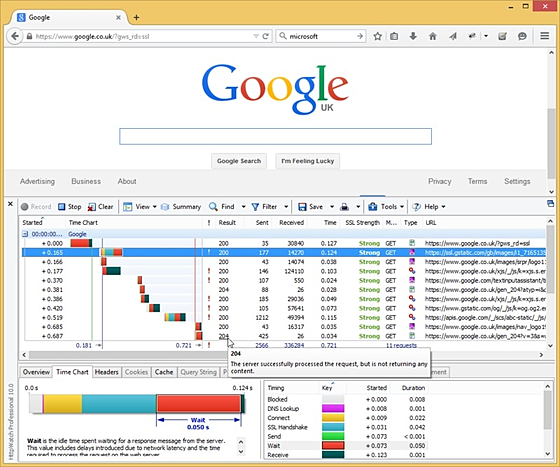
更新グラフ
バージョン履歴
Skip to content
Menu
Features
Features menu
All features ›
New in Version 16.x ›
Our customers ›
Compare
Compare menu
HttpWatch vs Chrome DevToolsThe same network data, with less diggingHttpWatch vs FiddlerBrowser capture, without a proxy in the wayCompare EditionsThe free Basic Edition and the Professional Edition
All comparisons ›
Learn
Learn menu
Pricing
Support
Download
Home
Download
Version History
(省略されました)
Menu
Features
Features menu
All features ›
New in Version 16.x ›
Our customers ›
Compare
Compare menu
HttpWatch vs Chrome DevToolsThe same network data, with less diggingHttpWatch vs FiddlerBrowser capture, without a proxy in the wayCompare EditionsThe free Basic Edition and the Professional Edition
All comparisons ›
Learn
Learn menu
Pricing
Support
Download
Home
Download
Version History
(省略されました)
16.2.5
-
02 Oct 2026
Improved: The main request grid now handles large numbers of requests more efficiently
Improved: The installer no longer uses child processes making the installation faster and more robust in some locked down environments
Fixed: HttpWatch could crash when a Edge or Chrome tab was closed while recording was active
Version
-
02 Oct 2026
Improved: The main request grid now handles large numbers of requests more efficiently
Improved: The installer no longer uses child processes making the installation faster and more robust in some locked down environments
Fixed: HttpWatch could crash when a Edge or Chrome tab was closed while recording was active
Version
16.2.4
-
15 Sep 2026
Fixed: HttpWatch could crash when a Edge or Chrome tab was closed
Improved: The installer now displays an explanation of why elevation failed if it was blocked by group policy
Version
-
15 Sep 2026
Fixed: HttpWatch could crash when a Edge or Chrome tab was closed
Improved: The installer now displays an explanation of why elevation failed if it was blocked by group policy
Version
16.2.3
-
27 Aug 2026
Improved: Starting the installer interactively with administrator rights now automatically shows the option to install for everyone on the computer
without requiring the /all-users=1 command line flag
Improved: When no native messaging connection is found, the Chrome and Edge extensions now link to the HttpWatch FAQ and explain how the
NativeMessagingUserLevelHosts policy can require an all-users installation
Updated: The installer now includes the version 16.2.3 CRX files for the Chrome and Edge extensions
Fixed: Corrected typos and errors in the API help
Fixed: TLS details now correctly classify ciphers and key exchange algorithms, recognize GCM and ChaCha20-Poly1305 as AEAD, classify TLS 1.1 as medium
strength, and leave unknown values unassessed
Version
-
27 Aug 2026
Improved: Starting the installer interactively with administrator rights now automatically shows the option to install for everyone on the computer
without requiring the /all-users=1 command line flag
Improved: When no native messaging connection is found, the Chrome and Edge extensions now link to the HttpWatch FAQ and explain how the
NativeMessagingUserLevelHosts policy can require an all-users installation
Updated: The installer now includes the version 16.2.3 CRX files for the Chrome and Edge extensions
Fixed: Corrected typos and errors in the API help
Fixed: TLS details now correctly classify ciphers and key exchange algorithms, recognize GCM and ChaCha20-Poly1305 as AEAD, classify TLS 1.1 as medium
strength, and leave unknown values unassessed
Version
16.2.2
-
25 Aug 2026
Changed: Updated help documentation to match recent updates and changes
Version
Fixed: Setup could report an in-use error when writing the HttpWatch Studio Start Menu shortcut
Fixed: An access denied message could occur during installation for the current user
-
25 Aug 2026
Changed: Updated help documentation to match recent updates and changes
Version
Fixed: Setup could report an in-use error when writing the HttpWatch Studio Start Menu shortcut
Fixed: An access denied message could occur during installation for the current user
16.2.1
21 Aug 2026
New: HttpWatch Studio and Chrome/Edge windows have new distinctive icons, with a red dot or empty circle showing whether the browser HttpWatch window is recording or stopped
New: Redesigned Windows Explorer icons for HWL and HAR files
New: Taskbar previews for Chrome and Edge now provide Record, Clear, Stop and Save buttons
New: The HttpWatch Studio taskbar menu now has an option to open a HWL or HAR log file
Improved: Live request and page timings are now derived solely from Chromium event timestamps
Improved: Tooltips now explain more Chromium network errors, including blocked requests, timeouts, connection resets, DNS failures and certificate errors
Fixed: HTML response fragments could be incorrectly displayed as XML in the Content pane
Fixed: Setup could report an in use error when writing the HttpWatch Studio Start Menu shortcut
Version
16.1.8
-
13 Aug 2026
New: A list of recently opened log files is displayed in the Windows task bar and start menu next to the HttpWatch Studio icon
Updated: The latest CRX files for the Chrome and Edge extensions are installed with HttpWatch
Fixed: A crash could occur in HttpWatch while recording when cookies were assigned in certain types of iframe or in about:blank
Fixed: A DeleteRows error could occur in HttpWatch when collapsing a page group
Fixed: A access denied message could occur during installation for the current user
21 Aug 2026
New: HttpWatch Studio and Chrome/Edge windows have new distinctive icons, with a red dot or empty circle showing whether the browser HttpWatch window is recording or stopped
New: Redesigned Windows Explorer icons for HWL and HAR files
New: Taskbar previews for Chrome and Edge now provide Record, Clear, Stop and Save buttons
New: The HttpWatch Studio taskbar menu now has an option to open a HWL or HAR log file
Improved: Live request and page timings are now derived solely from Chromium event timestamps
Improved: Tooltips now explain more Chromium network errors, including blocked requests, timeouts, connection resets, DNS failures and certificate errors
Fixed: HTML response fragments could be incorrectly displayed as XML in the Content pane
Fixed: Setup could report an in use error when writing the HttpWatch Studio Start Menu shortcut
Version
16.1.8
-
13 Aug 2026
New: A list of recently opened log files is displayed in the Windows task bar and start menu next to the HttpWatch Studio icon
Updated: The latest CRX files for the Chrome and Edge extensions are installed with HttpWatch
Fixed: A crash could occur in HttpWatch while recording when cookies were assigned in certain types of iframe or in about:blank
Fixed: A DeleteRows error could occur in HttpWatch when collapsing a page group
Fixed: A access denied message could occur during installation for the current user
16.1.8
-
13 Aug 2026
Fixed: A crash could occur in HttpWatch while recording when cookies were assigned in certain types of iframe or in about:blank
Fixed: A DeleteRows error could occur in HttpWatch when collapsing a page group
Fixed: A access denied message could occur during installation for the current user
Improved: The display of binary content, such as WOFF fonts, in the Content tab has been improved
Improved: HttpWatch Basic can now be uninstalled silently using winget
Improved: The winget install package for HttpWatch now supports --scope user and --scope machine
Changed: If the installer is started using the local system account (e.g. by an automated software management tool), the installation will be for all
users on the machine regardless of the value of the /all-users flag.
Changed: Page groups are now always displayed in chronological order rather than by the sort column in the HttpWatch plugin for Chrome and Edge. The
requests within each page group are still sorted by the selected sort column. This change makes it easier to find where new requests are being saved. The
ordering in HttpWatch Studio remains the same - page groups are sorted by the selected sort column (e.g. URL or Bytes Sent)
Updated: The latest CRX files for the Chrome and Edge extensions are installed with HttpWatch
Version
-
13 Aug 2026
Fixed: A crash could occur in HttpWatch while recording when cookies were assigned in certain types of iframe or in about:blank
Fixed: A DeleteRows error could occur in HttpWatch when collapsing a page group
Fixed: A access denied message could occur during installation for the current user
Improved: The display of binary content, such as WOFF fonts, in the Content tab has been improved
Improved: HttpWatch Basic can now be uninstalled silently using winget
Improved: The winget install package for HttpWatch now supports --scope user and --scope machine
Changed: If the installer is started using the local system account (e.g. by an automated software management tool), the installation will be for all
users on the machine regardless of the value of the /all-users flag.
Changed: Page groups are now always displayed in chronological order rather than by the sort column in the HttpWatch plugin for Chrome and Edge. The
requests within each page group are still sorted by the selected sort column. This change makes it easier to find where new requests are being saved. The
ordering in HttpWatch Studio remains the same - page groups are sorted by the selected sort column (e.g. URL or Bytes Sent)
Updated: The latest CRX files for the Chrome and Edge extensions are installed with HttpWatch
Version
16.1.7
-
27 Jul 2026
Fixed: an 'abnormal termination error' could occur when installing HttpWatch
Version
-
27 Jul 2026
Fixed: an 'abnormal termination error' could occur when installing HttpWatch
Version
16.1.6
16.1.5
16.1.4
-
27 Jul 2026
New: HttpWatch can now be installed without administrator rights for the current user only
New: To install for all users on the machine, run the installer with the /all-users=1 command line option
Fixed: the uninstaller did not remove all HttpWatch items from the Windows Start menu
Version
16.1.3
-
22 Jul 2026
New: HttpWatch can now be installed without administrator rights for the current user only
New: To install for all users on the machine, run the installer with the /all-users=1 command line option
Fixed: the uninstaller did not remove all HttpWatch items from the Windows Start menu
Version
-
27 Jul 2026
New: HttpWatch can now be installed without administrator rights for the current user only
New: To install for all users on the machine, run the installer with the /all-users=1 command line option
Fixed: the uninstaller did not remove all HttpWatch items from the Windows Start menu
Version
16.1.3
-
22 Jul 2026
New: HttpWatch can now be installed without administrator rights for the current user only
New: To install for all users on the machine, run the installer with the /all-users=1 command line option
Fixed: the uninstaller did not remove all HttpWatch items from the Windows Start menu
Version
 RSS[全体]
 Tw[@softantenna]