Microsoftは2月20日(現地時間)、Windows 11のWindows Insider ProgramのDevチャンネル向けの最新ビルド「Windows 11 Insider Preview Build 26300.7877(KB5077232)」をリリースしました(Windows Blog)。
Devチャンネルで公開されるビルドは、将来の機能アップデートで追加される可能性のある、さまざまな新機能が先行して実装されています。特定のリリースとは直接結びつけられておらず、ビルドに含まれる新機能や改善点は、準備が整い次第、将来のWindowsリリースに反映される可能性があります。
Windows Insider Programの更新オプションでDevチャンネルを選択し、Windows 11のプレビュー版を使用しているユーザーは、Windows Updateを利用して最新版に更新することができます。
Build 26300.7877の新機能
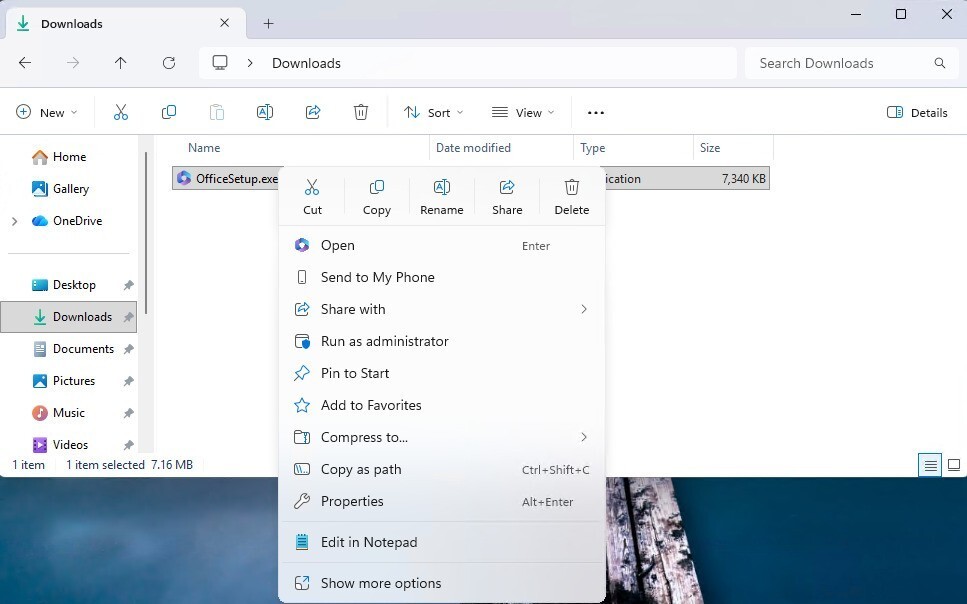
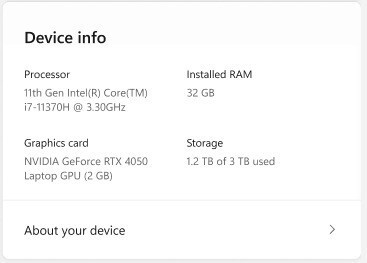
Build 26300.7877では、コンテキストメニューの改善が行われ、.exe / .bat / .cmdを右クリックした際の 「開く」アイコンが、既定アプリのアイコンと一致するように変更されています。また、設定アプリの「デバイス情報」カード刷新され、主要スペックがより簡潔に表示されることによって、読みやすさが向上しています。
リリースノートは以下の通りです。
Changes and Improvements gradually being rolled out with toggle on*
[Context Menu]
- When right clicking on a .exe, .bat, or .cmd file, the context menu’s “Open” verb will now match the icon associated with the file’s default app.
- Feedback: Share your thoughts in Feedback Hub (WIN + F) under File Folders and Online Storage > File Explorer.
[Settings]
- Device Cards:
- Previously released to WIP channels June 2025, the ‘Device info’ Card on the Settings Home page has been refined based on early learnings. This update simplifies key device specifications and improves consistency across the end to end flow from the Home Card to the Settings > System > About page, making information easier to scan and understand. This consumer experience is currently rolling out to Insiders in the United States.
- A version of the Device info Card intended for enterprise users on IT managed devices continues to be available.
- In Settings > System > About, based on early customer feedback, key device hardware details are once again prominently displayed at the top of the page, making it easy to understand your device at a glance. The Device information section now brings together additional system details such as graphics and storage information in a single location, with easy copy/paste support to simplify sharing or support scenarios. Device related frequently asked questions are not currently surfaced as we continue iterating the best way to deliver contextual help across Settings.
- Feedback: Share your thoughts in Feedback Hub (WIN + F) under the Settings category.
[Taskbar & System Tray]
- We have improved the animations for mousing over app groups on the taskbar.
- Improved reliability of showing app icons in the system tray when the taskbar was set to autohide.
[File Explorer]
- Addressed an issue where all File Explorer open windows and tabs might unexpectedly jump to Desktop or Home.
[Nearby Sharing]
- Improved the reliability of sending larger files using nearby sharing.
公式ブログには細かな変更内容がリストアップされていますので、インストールする前に確認することをおすすめします。